Posts

Showing posts with the label Google Tag Manager

GTM dataLayer and Adobe Client Data Layer: a side-by-side comparison of usage

Image
Data layers are an essential component of modern web analytics implementation. They provide an easily accessible and dynamic means of providing data from the website for marketing and analytics purposes, keeping it separate from the website's application layer. The most common data layer is probably the one associated with Google Tag Manager, or GTM. But other tag management systems, like Tealium, also provide their own data layers. The "new kid on the block" is the Adobe Client Data Layer, released in 2020. Unlike the other data layers, this one is independent of any tag management system, making it portable as well. I've prepared a simple, side-by-side comparison of how GTM dataLayer and Adobe Client Data Layer are used. This will help you be in a better position to understand their similarities and differences, and also how to properly transition from one to the other seamlessly. GTM dataLayer and Adobe Client Data Layer: a side-by-side comparison of us...
Google Analytics App+Web Property: setting up an Event tag

Image
This is part of a series on Google Analytics App+Web Property. A brief walkthrough of the setup Setting up a Configuration tag Setting up an Event tag (this post) In my previous post, I had shared my learnings while setting up a Google Analytics App+Web Property's Configuration tag, which included not one, not two, but three gotchas. That experience was quite an eye-opener for someone who is familiar with how things "just work" with Google Analytics Universal Analytics tags. While a Configuration tag is good enough to get started, the real "fun" comes with Event tags. These tags are used to track users' interactions with your website, like clicks on links or form submissions. Some events have already been automatically setup in my App+Web Property's web data stream's "Enhanced Measurement" in Google Analytics (GA), like scrolls, file downloads and outbound link clicks. Once again, my tags are setup in Google Tag Manager (GTM), ...

Google Analytics App+Web Property: setting up a Configuration tag

Image
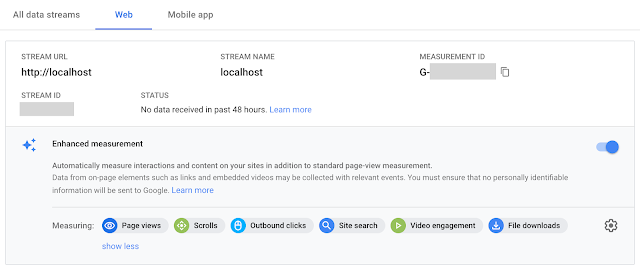
This is part of a series on Google Analytics App+Web Property. A brief walkthrough of the setup Setting up a Configuration tag (this post) Setting up an Event tag In my previous post, I had provided a walkthrough of setting up a Google Analytics App+Web Property. If you don't know what this App+Web Property is or you want to learn again how to setup that property, head over to that post to read my review. But an analytics property is kinda useless if you don't track any data to it. So in this post, I'll share how to setup some tags with Google Tag Manager (GTM) for a website, and what results you can expect from those tags. What you'll find in this post: My App+Web Configuration tag The resulting network hits to GA Three gotchas that you must watch out for! Here's my App+Web Property's web data stream in Google Analytics (GA): I've left it with its default "Enhanced Measurement" setup. That means besides tracking Page views ...

Track Internal Campaigns to Google Analytics using Google Tag Manager

Image
If you use Google Analytics (GA) in your website, then you're probably already tracking your external campaigns properly. But are you tracking your internal campaigns as well? These are marketing campaigns that you run within your website, like homepage banners that link to promoted products. External campaigns are tracked with GA's built-in utm_source, utm_medium, utm_campaign, utm_content and utm_term parameters to identify the marketing campaigns that drive users to your website. However, for internal campaigns, you shouldn't use these utm_source / utm_medium / etc tracking. If you do, GA replaces your external campaign tracking with these internal ones. There are four ways to track internal campaigns in GA: Method Pros Cons Enhanced Ecommerce's Promotions Designed for internal campaign reporting, built into GA Report is limited to Ecommerce's metrics Events Quick to setup and understand Limited to clicks on links, doesn't encapsula...