Posts

Showing posts with the label Google Analytics

Adobe Analytics and Google Analytics terminologies cheat sheet

When going from an Adobe Analytics world to a Google Analytics world or vice versa, you're bound to face terminologies that you're unfamiliar with, mainly because of how both products have evolved in their functionality over time. But never fear! Here's a handy cheat sheet to help you know what something in Adobe Analytics is similar ( but not always equivalent! ) to in Google Analytics, or the other way around. Base Terminologies Adobe Analytics Google Analytics Remarks Report Suite Property Besides data storage, an Adobe Analytics Report Suite provides the primary reporting interface. A Google Analytics Property does not have a reporting interface. Instead, its reporting interface is a View. Virtual Report Suite View An Adobe Analytics Virtual Report Suite is based on applying a segment to a Report Suite. A Google Analytics View is based on applying many filters to a Property. Visitor ID Client ID Modern implementations of Adobe Analytics rel...

"Visit" in Adobe Analytics and Google Analytics

Image
Update (10 December 2020) : the Google Analytics definition of "visit" used here is for Classic and Universal Analytics. It is not applicable to Firebase / GA4's definition. In a perfect web analytics world, an analyst would be able to take all of his knowledge about one product and apply it to another. All of their technical and analytical knowledge would be transferable easily, and the analyst can easily switch between web analytics products without missing a beat. But we don't live in that perfect web analytics world. So we have to contend with differences in web analytics products, especially technical differences that result in reporting differences. One of those differences is something as fundamental as what a "visit" is. Understanding this is crucial to a web analyst's job because it is the foundation upon which a lot of other data and reports depend on. Crucially, metrics like Conversion Rates and dimensions like User Loyalty depend on what ...

Google Analytics App+Web Property: setting up an Event tag

Image
This is part of a series on Google Analytics App+Web Property. A brief walkthrough of the setup Setting up a Configuration tag Setting up an Event tag (this post) In my previous post, I had shared my learnings while setting up a Google Analytics App+Web Property's Configuration tag, which included not one, not two, but three gotchas. That experience was quite an eye-opener for someone who is familiar with how things "just work" with Google Analytics Universal Analytics tags. While a Configuration tag is good enough to get started, the real "fun" comes with Event tags. These tags are used to track users' interactions with your website, like clicks on links or form submissions. Some events have already been automatically setup in my App+Web Property's web data stream's "Enhanced Measurement" in Google Analytics (GA), like scrolls, file downloads and outbound link clicks. Once again, my tags are setup in Google Tag Manager (GTM), ...

Google Analytics App+Web Property: setting up a Configuration tag

Image
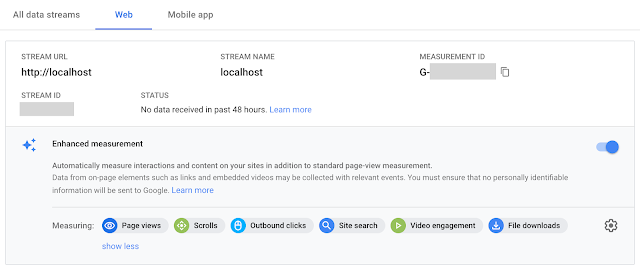
This is part of a series on Google Analytics App+Web Property. A brief walkthrough of the setup Setting up a Configuration tag (this post) Setting up an Event tag In my previous post, I had provided a walkthrough of setting up a Google Analytics App+Web Property. If you don't know what this App+Web Property is or you want to learn again how to setup that property, head over to that post to read my review. But an analytics property is kinda useless if you don't track any data to it. So in this post, I'll share how to setup some tags with Google Tag Manager (GTM) for a website, and what results you can expect from those tags. What you'll find in this post: My App+Web Configuration tag The resulting network hits to GA Three gotchas that you must watch out for! Here's my App+Web Property's web data stream in Google Analytics (GA): I've left it with its default "Enhanced Measurement" setup. That means besides tracking Page views ...

Google Analytics App+Web Property: a brief walkthrough of the setup

Image
This is part of a series on Google Analytics App+Web Property. A brief walkthrough of the setup (this post) Setting up a Configuration tag Setting up an Event tag On 31 July 2019, Google Analytics a new way to measure app and web usage. It uses a new property (data store) called, creatively enough, "App+Web Property" . You can read the announcement at your own time. By the way, I'm just going to put this out here first and foremost. If you depend on Enhanced Ecommerce, in particular, if you use product-scoped Custom Dimensions and/or Metrics, then you might want to hold off using the App+Web property for now. As with Firebase measurement, the App+Web property does not have any support for product-scoped Custom Dimensions/Metrics (yet). To setup a new App+Web property in Google Analytics, create a new Property like you would inside GA's interface. Go to your Analytics admin. Choose the Account where you want to setup your App+Web Property. It can be an...

Setting up googleAnalyticsR on Google Cloud Platform's Compute Engine

When it comes to using Google Analytics data in R, you have quite a number of packages to work with. One such package that has seen recent, frequent updates is googleAnalyticsR , written by Mark Edmondson. googleAnalyticsR works great when you're running it in your own script. But when you need to use it on a remote server, for example, to generate scheduled reports, you may find yourself jumping through hoops and hurdles just to set this up, particularly with authorization. Here's a guide based on my experience of setting up googleAnalyticsR on a Google Cloud Platform (GCP) Compute Engine instance. It covers all the required setup steps, from software installation to authorization to running a quick test. How to setup googleAnalyticsR on a Google Cloud Platform Compute Engine instance Setup a Compute Engine instance The bare minimum specifications for your Compute Engine instance should be: n1-standard-1, i.e. 1 vCPU with 3.75GB memory 10GB boot disk running the ...

Querying Google Analytics data as flat tables from BigQuery: The Definitive Guide and Recipe

Image
If you're using Google Analytics 360, the premium version of Google Analytics, then chances are you have setup an automatic export of your Google Analytics data into BigQuery. This allows your hit-level data in Google Analytics to be exported to BigQuery datasets every day. But Google does not provide much help with figuring out how to query your data! Google Analytics provides a cookbook of sample BigQuery queries . But these are very limited in scope. And they omit the most trivial -- yet important -- query that you will ever run: Get a flat table of results that you can export into a CSV file or a SQL database Flat tables are essential to perform further work on the results with Python, R and other data science languages. Another flaw in the cookbook is that it uses BigQuery's older Legacy SQL. BigQuery is already moving to its Standard SQL. But examples based on Google Analytics data were either difficult to find or based on guesswork that had not been tested...

Do not use blank "campaignId" strings with Google Analytics tags

Image
Recently, I encountered this curious problem with a client's Google Analytics Source/Medium report: the top Source/Medium by sessions was "(not set) / (not set)". This was very, very unusual. What could possibly cause GA to not recognise Source/Mediums correctly? The short answer was that a blank string had been set as the "campaignId" in the GA tags. Since GA couldn't interpret the blank string, it simply saved the Source/Medium as "(not set) / (not set)". Special thanks to Jason Packer (@jhpacker in measure.slack.com ) for his help here.

Track Internal Campaigns to Google Analytics using Google Tag Manager

Image
If you use Google Analytics (GA) in your website, then you're probably already tracking your external campaigns properly. But are you tracking your internal campaigns as well? These are marketing campaigns that you run within your website, like homepage banners that link to promoted products. External campaigns are tracked with GA's built-in utm_source, utm_medium, utm_campaign, utm_content and utm_term parameters to identify the marketing campaigns that drive users to your website. However, for internal campaigns, you shouldn't use these utm_source / utm_medium / etc tracking. If you do, GA replaces your external campaign tracking with these internal ones. There are four ways to track internal campaigns in GA: Method Pros Cons Enhanced Ecommerce's Promotions Designed for internal campaign reporting, built into GA Report is limited to Ecommerce's metrics Events Quick to setup and understand Limited to clicks on links, doesn't encapsula...